


You’ve got a beautiful product, a sleek design, and steady traffic — yet sales aren’t following through. Why? You’ve tried everything: new themes, urgency timers, trust badges — but checkout is still silent. Here’s the truth: high-converting product pages don’t need more flash; they need less friction.
Think of it like this: piling on design tweaks is like overpacking a suitcase with clothes you’ll never wear. The real blockers are hidden — price confusion, slow load times, surprise fees. The key? A seamless path that moves customers effortlessly from interest to purchase.
We’re going to walk you through 8 proven ways to create high-converting product pages — helping you clear the clutter, remove friction, and finally turn clicks into sales.
1. Write product descriptions that convert
A winning product description does more than describe — it persuades. It highlights benefits, details, and trust factors that erase doubt and inspire confidence.
What problem does it solve?
Start by connecting to a customer’s pain point or desired outcome. Example: “Sleep better on hotel-quality sheets.”
What exactly am I getting?
List features and specs clearly. Example: “1,000-thread count Egyptian cotton stays cool in summer, warm in winter. Pre-shrunk, deep-pocket fit for mattresses up to 18 inches.”
Why should I trust it?
Add proof: customer results, guarantees, or quality claims. Example: “Pre-shrunk design prevents shrinking after washing, ensuring lasting comfort.”
Configurable products:
For items with multiple options, offer intuitive selection fields — swatches, radio buttons, or checkboxes. With Advanced Product Fields for WooCommerce, you can dynamically update images, prices, and details as customers customize — reducing surprises and boosting confidence.
Best practices:
-
Use customer-centered language.
-
Format with headings, bullets, and short paragraphs for easy scanning.
-
Include all relevant details: size, materials, care, warranty.
-
Lead with benefits in the first few lines to hook attention fast.
2. Optimize images for desire and clarity
Images sell. High-quality visuals remove doubt, showcase quality, and spark emotion. A strong image strategy includes five key types that highlight your product’s beauty, function, and real-world use — turning browsers into confident buyers.

-
Hero image: Instantly communicates your product’s identity and appeal.
-
Detail shots: Showcase textures, finishes, and craftsmanship up close.
-
Scale references: Help shoppers visualize size and proportions accurately.
-
Variation images: Clearly display available colors, sizes, and styles.
-
In-use demos: Lifestyle photos or models using the product to show real-world context.
For customizable products, dynamic image swapping is a game-changer. As customers select different options, the main image should update in real time — reducing confusion and building confidence. With Advanced Product Fields, this happens seamlessly, giving shoppers instant visual feedback and fewer surprises at checkout.
Add videos or GIFs to demonstrate movement, functionality, or 360° views — especially for complex items. When customers can see the product in action, they’re far more likely to trust and buy it.
Clear, engaging visuals create desire, reduce hesitation, and guide customers effortlessly toward conversion.
3. Master the 3-second mobile performance test
Fast pages convert — slow ones don’t. Nearly half of online shoppers abandon pages that take longer than 3 seconds to load. That means every second you save could be the difference between a sale and a bounce.
How to stay under 3 seconds:
-
Compress images: Reduce file sizes while keeping clarity.
-
Defer scripts: Load only what’s essential first; delay the rest.
-
Audit plugins: Remove redundant or slow add-ons that drag performance.
Use Google PageSpeed Insights to test your site regularly. Aim for under 3 seconds on mobile and monitor key metrics like LCP (Largest Contentful Paint), INP (Interaction to Next Paint), and CLS (Cumulative Layout Shift).
Every millisecond counts — faster pages build trust and keep shoppers moving smoothly toward checkout.
4. Structure content for humans who scan and bots who rank
Most visitors don’t read product pages — they scan them. A well-structured layout ensures humans find what they need instantly while giving search engines clear signals to boost your visibility.
Above the fold, prioritize:
-
Product name with a primary keyword.
-
Visible price — no surprises.
-
A strong “Buy Now” or “Add to Cart” button.
As users scroll, gradually reveal specs, benefits, and proof points. This progressive flow keeps pages clean and prevents overwhelm while nurturing intent.
Use clear H2 and H3 headings for hierarchy and easy navigation. Keep titles descriptive (75–100 characters) with essential details like size, color, or model — this helps both readers and search results.
When your content is structured for clarity, visitors stay engaged longer, search rankings improve, and conversions rise naturally.
5. Create customizable products with transparent pricing
Personalization drives engagement — but confusion kills conversions. The best customizable product pages make every option clear and every cost visible.
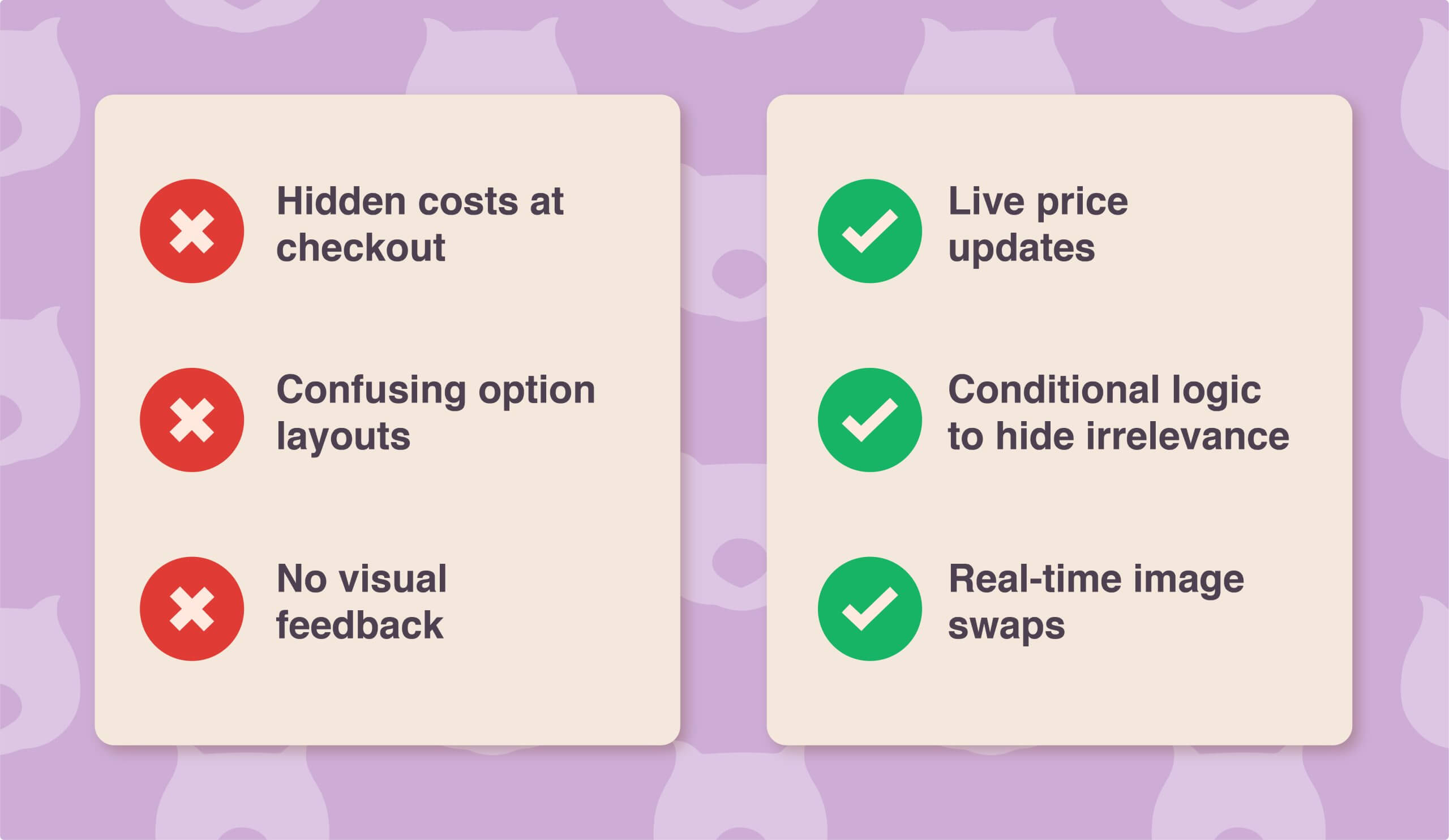
Where customization fails:
-
Hidden fees appear only at checkout.
-
Option menus feel cluttered or hard to understand.
-
No real-time feedback when selections are made.
Advanced Product Fields fixes all of this. It updates pricing live as customers make changes, preventing surprises. Dynamic visuals automatically swap the main image when options change. Conditional logic displays only what’s relevant (like showing an engraving text field only when selected). Formula-based pricing even handles complex cases — like square-meter rates or tiered bulk discounts — automatically.
The result: full transparency, zero confusion, and more confident purchases.
-
5. Create customizable products with transparent pricing
Transparency builds trust — especially when products are customizable. Shoppers want clarity, not surprises. When every selection updates in real time, they feel in control and confident in their purchase.
Smart strategies that drive conversions:
-
Offer discounts or bundles to encourage higher-value orders.
-
Use limited-time offers to create natural urgency.
-
Design clean, guided layouts with conditional logic to prevent decision fatigue.
When customization is clear, visual, and interactive, customers know exactly what they’re getting. This confidence reduces abandoned carts, boosts conversions, and turns product configurability into a true sales advantage.
6. Build trust signals that match your price point
Trust is the foundation of every conversion — but not all trust signals fit every product. Align your proof and reassurance with your price level.
For budget-friendly products:
-
Keep it simple — clear returns, easy support, transparent policies.
For premium or high-ticket items:
-
Offer money-back guarantees, extended warranties, or dedicated support. These show confidence and reduce hesitation.
Avoid manipulative tactics like fake “X people are viewing” notices or overused countdown timers — they may create clicks, but they erode credibility. Instead, lean on authentic social proof: customer photos, detailed testimonials, and real-world use cases.
When buyers see real people benefiting from your product, trust naturally follows — and so do conversions.
7. Use discounts to boost sales without overcomplicating the experience
Discounts work best when they’re simple, visible, and fair. Shoppers should understand the offer instantly — no fine print, no confusion.
With WooCommerce Discounts, you can create deals that drive action: bundles, bulk pricing, or targeted offers — all updating prices in real time to reinforce value.
Enhance clarity with:
-
Quantity swatches that show price changes visually.
-
Step intervals and helpful prompts to prevent invalid selections.
-
Conditional logic to personalize discounts for specific products or customers.
You can even schedule promotions, display custom messages on product or cart pages, and highlight limited offers in a natural, trustworthy way.
The result? A shopping experience that feels rewarding — not complicated.
8. Test and refine continuously
Great product pages aren’t static; they evolve. Regular testing ensures every detail — from pricing to images — keeps working at peak performance.
Weekly:
Run quick audits. Spend 30 minutes reviewing cart abandonment data, tweaking headlines, or refreshing visuals that could improve engagement.
Monthly:
Go deeper. Dedicate 2–3 hours to analyzing behavior patterns, identifying friction points, and restructuring layouts or pricing displays.
Quarterly:
Do a full-page overhaul. Benchmark against competitors, update trust elements, and test new ideas on your best-selling products first — then roll out proven improvements across your catalog.
Every small gain compounds. Faster load times, clearer pricing, and credible trust signals don’t just add up — they multiply results.
Instead of chasing new traffic, focus on converting the visitors you already have. Your highest-traffic product page is your best testing ground — optimize it, document what works, and scale success.
Remember: high-converting product pages are built with intention, not luck.
To accelerate the process, tools like Advanced Product Fields for WooCommerce make it easy to create transparent, customizable, and conversion-optimized pages — helping you turn browsers into buyers faster than ever.



No comment