
If you’re offering gift wrapping, fragile item protection, or custom packaging, it’s perfectly reasonable to charge extra—these services come with real costs. But how should you apply those fees? Should they be built into your shipping rate, or added separately?
The key is to align your fee structure with where your costs actually occur. For example, a per-item charge for gift wrapping calls for a different setup than a flat-rate fee for handling small orders or out-of-state deliveries.
Before diving into plugin options, take a step back and evaluate what your store really needs. This guide will walk you through the right time to use product-level fees, how Advanced Product Fields simplifies item-specific charges, and how to set it all up in a way that won’t complicate taxes or refunds.
What are handling fees, and why should you care?
A handling fee is an additional charge added to cover the behind-the-scenes work—like packaging, prepping, and processing orders—that goes beyond standard shipping costs. When implemented correctly, it keeps your margins healthy without surprising your customers.
Here’s how the 3 fee types work:
| Fee type | What it covers | Who gets paid |
|---|---|---|
| Handling fees | Order preparation, packaging materials, and labor time for special processing | You (your business account) |
| Shipping fees | Base transportation costs from warehouse to customer, plus any extra packaging or faster delivery you bundle into the shipping rate | Mixed: You keep costs you bundle in (fragile wrapping, reinforced boxes); carrier keeps faster delivery fees |
| Gateway fees | Payment processing charges | PayPal, Stripe, or your payment processor |
Does WooCommerce Charge a Fee?
Nope. WooCommerce itself is free.
There are no transaction fees, no monthly charges, and no hidden handling fees baked into the platform. That surprises many new store owners, but WooCommerce simply adds eCommerce functionality to WordPress—without taking a cut.
However, other parties do charge fees:
- Payment processors like Stripe (2.9% + $0.30 per transaction) and PayPal charge for transactions.
- Shipping carriers like USPS, FedEx, UPS, and DHL have their own delivery rates.
- Handling fees are your choice—and that’s what this guide is all about.
Why Handling Fees Matter
Handling fees are charges you apply to cover costs beyond basic shipping—like gift wrapping, fragile item packaging, or rush services. It’s the one fee where you keep 100% of the revenue, but it can be tricky to get right without upsetting your customers.
When Should You Charge Handling Fees?
Can you just fold them into shipping costs? Technically, yes. But ethically, it’s a bad move—because it forces every customer to pay for services that only some choose.
Instead, separate handling fees build trust and give shoppers transparency and choice.
Four Situations That Justify Handling Fees:
Optional Services Customers Can Decline
- Gift wrapping
- Insurance or protection plans
- Rush order processing
Labor-Intensive Services
- Custom engraving or personalization
- Product assembly
- Industry compliance documentation
Special Product Requirements
- Fragile item packaging (e.g., glassware)
- Hazardous materials (e.g., batteries)
- Temperature-sensitive shipping (e.g., chocolates)
Profit Protection for Low-Cost Products
- Example: A $12 mug with $1.50 packaging loses margin fast.
- A handling fee helps cover that cost and keeps your pricing fair.
When Handling Fees Don’t Make Sense
Avoid adding handling fees if:
- The cost is related to transportation (use shipping instead).
- Most of your products need the same handling (bundle it into pricing).
- The fee would exceed 20% of the product price (raises red flags).
- You can absorb the cost without hurting your bottom line.
Transparency is key. A clear $5 gift wrap line builds trust. A $15 shipping charge on a 2-ounce item? That causes cart abandonment—and angry emails.
Product-Level vs Cart-Level Fees
Once you decide to charge handling fees, you need to choose the right structure:
- Product-Level Fees
Best for: Services or packaging tied to specific items.
Example: A fragile vase with a $5 per-item handling fee.
Automatically scales by quantity, shows up on product pages, and is taxed/refunded as part of the item.
- Cart-Level Fees
Best for: Order-wide conditions like low-value surcharges.
Example: A $3 surcharge for orders under $50.
Get this wrong, and you could face tax, refund, or customer support headaches—no matter what plugin you use.
When to use product-level fees:
| Use case | Why product level works |
|---|---|
| Gift wrapping | Tied to specific products, the customer chooses per item |
| Fragile item protection | Based on product materials/category |
| Custom engraving | Service applies to individual items |
| Rush processing | When turnaround applies to specific products, not entire orders |
Cart-focused handling fees
These fees are applied when specific cart conditions are fulfilled.
How cart-level fees work:
- Applied once per order.
- Can be conditional on cart total, payment method, or shipping destination.
- Require separate tax class configuration.
- May not refund automatically with product returns.
When to use cart-level fees:
| Use case | Why cart level works |
|---|---|
| Small order surcharge | “Orders under $50 add $3 handling” |
| Payment gateway fees | “Credit card orders add 2.9%” |
| Remote area fees | Based on shipping destination |
| Bulk order processing | “Orders over 20 items add $10 handling” |
If you’re looking for cart-level fees, we recommend Extra Fees for WooCommerce or Checkout Manager.
Adding product-level handling fees with Advanced Product Fields for WooCommerce
Advanced Product Fields lets you add custom options directly to your WooCommerce product pages, with each option capable of adjusting the product price in real time.
For handling fees, this means customers see the extra charge immediately when they select gift wrapping or fragile protection – not as a surprise at checkout.
Key features for product-level handling fees
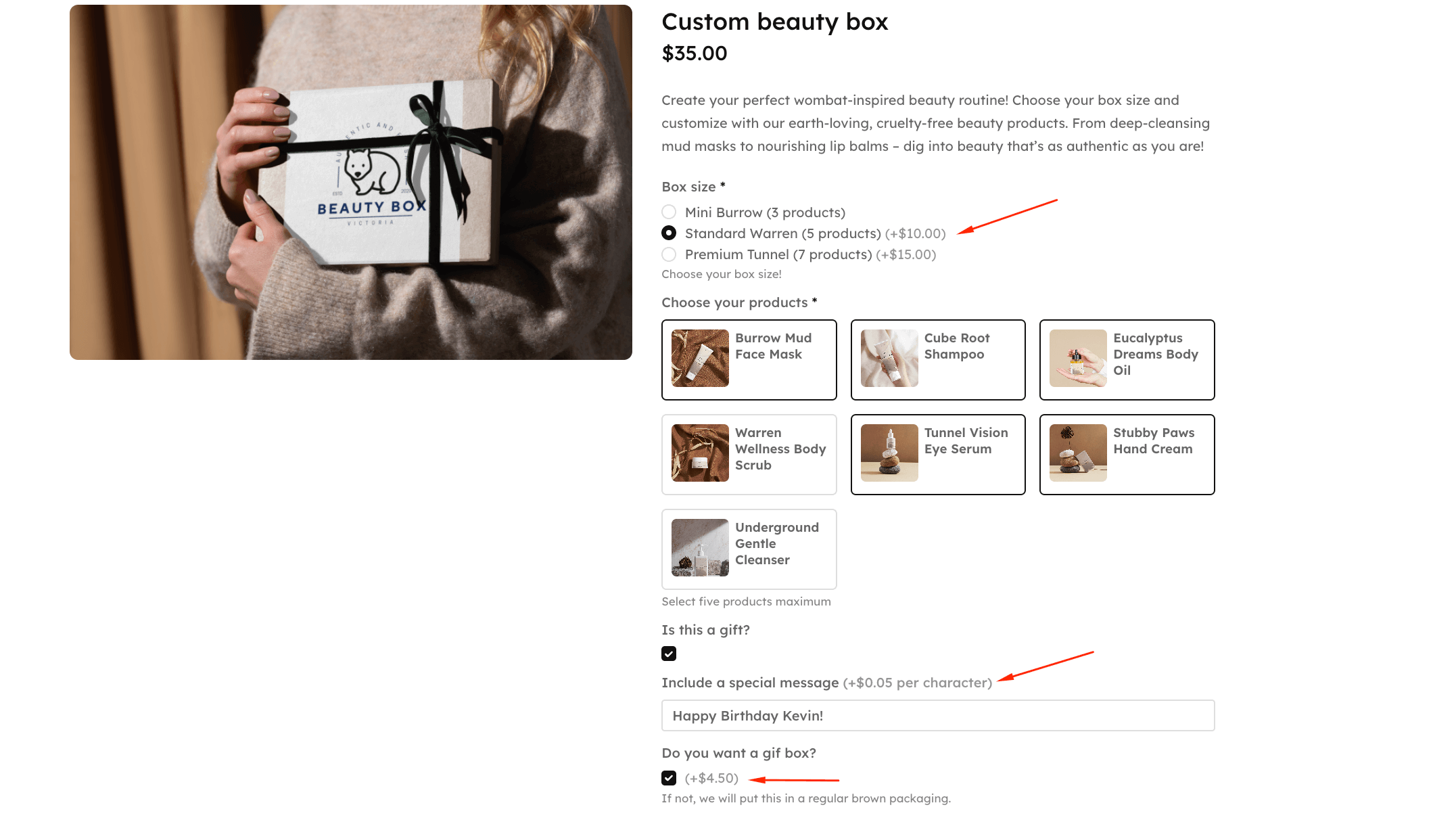
Field types that work for handling fees:
- Checkboxes for binary choices (“Add gift wrapping +$5”)
- Radio buttons for exclusive options (standard, premium, or luxury packaging)
- Text fields for custom input (messages that charge per character)
Pricing models:
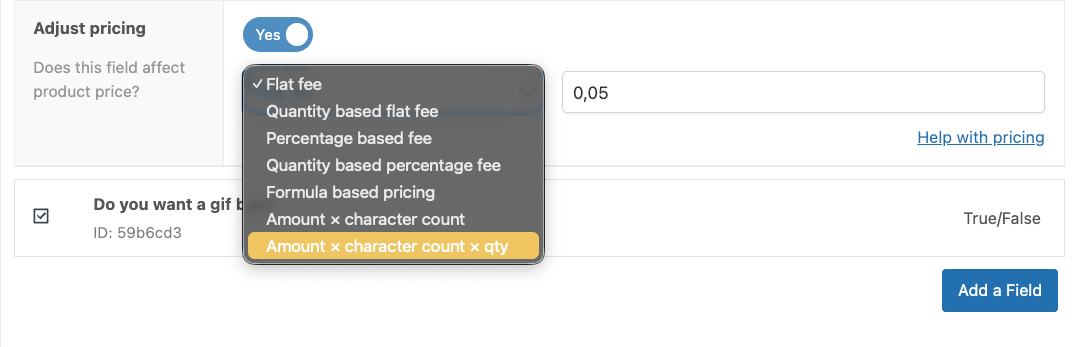
- Flat fees ($5 gift wrap per item)
- Percentage-based (5% rush processing fee)
- Quantity-aware (fees multiply with quantity automatically)
- Formula-based calculations (charge $0.05 per character for custom messages and engraving)
Advanced capabilities:
- Conditional logic to show/hide fields based on product categories, attributes, or other selections, e.g. a text box appears for the buyer to include in a message if they have selected that the item is a gift
- Real-time price updates without page reload
- Fees integrate as product line items (simplifying tax and refund handling)
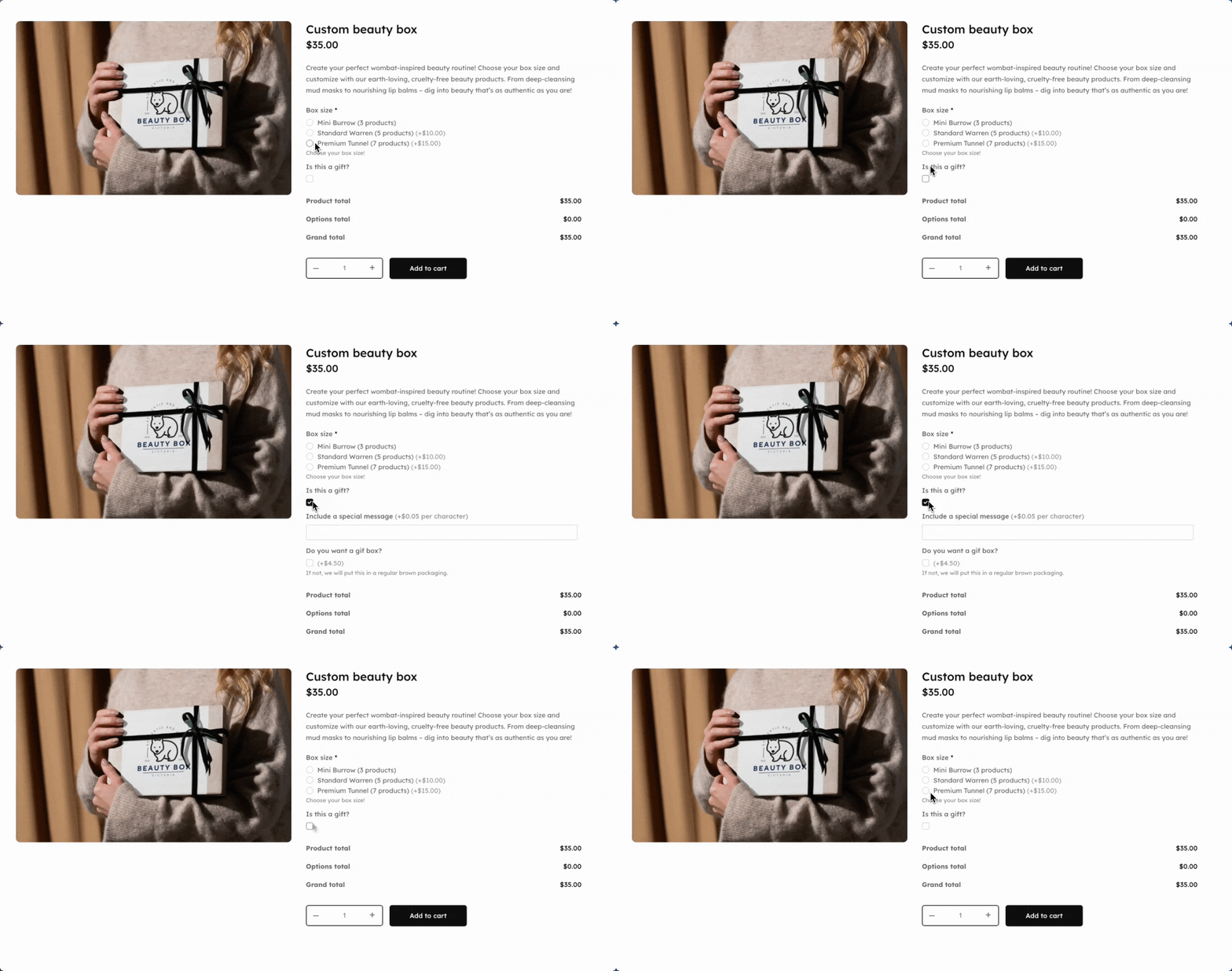
Examples of industries where product fees excel:
| Type of store | Example fees |
|---|---|
| Homeware store | Auto-apply a $3 protection fee to all items in your “Glass” category. Customers see the fee immediately on product pages, understand why it exists, and the charge scales with quantity (3 wine glasses = $9 protection fee). |
| Personalization business | Charge $0.25 per character for engraving with real-time preview as customers type their message. A 12-character name costs $3, a 20-character message costs $5 – calculated instantly. |
| Gift shop | Offer 3 tiers of gift wrapping that customers select on the product page: – Basic wrap: +$3 – Premium gift box: +$8 – Luxury presentation: +$15 |
| Electronics retailer | Add mandatory hazmat fees for battery shipments that vary by quantity ordered. 1 battery pack = $4 hazmat fee, 5 battery packs = $20 hazmat fee (no manual configuration needed). |
How to add gift wrapping and packaging services
Adding your own handling fees for gift wrapping is simple, even if you want to add more complex configurations for customizable orders, thanks to our lightweight plugin. We’ll start with a simple gift box option:
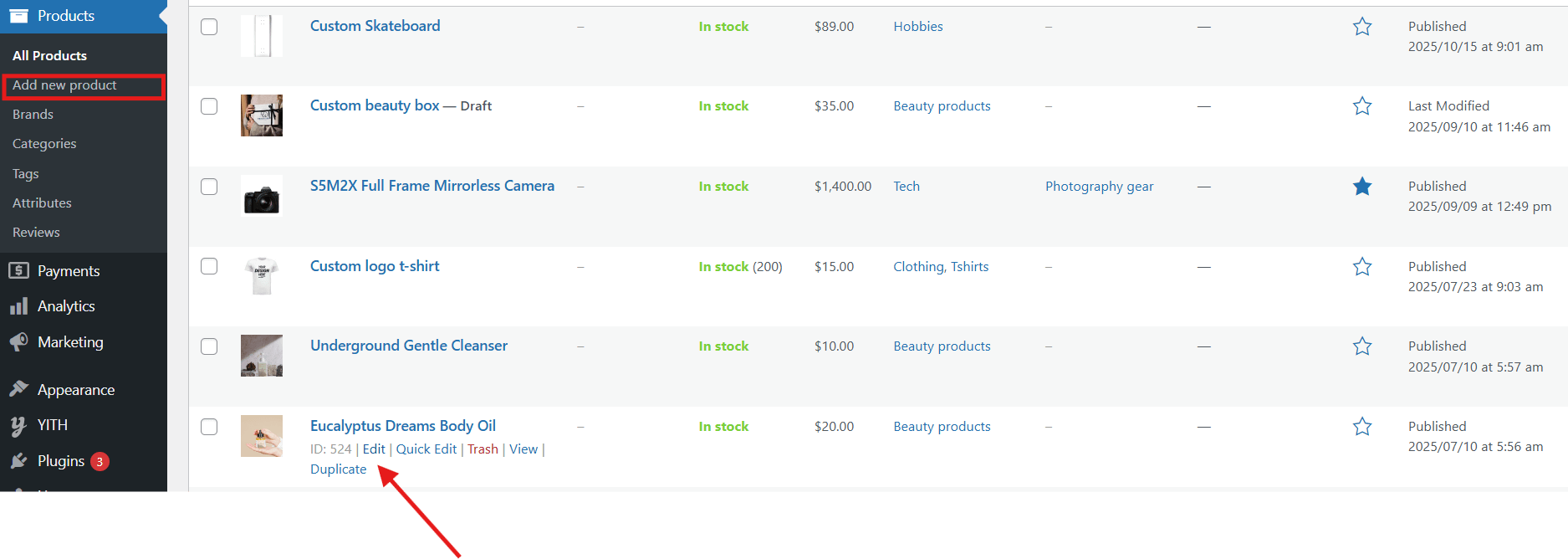
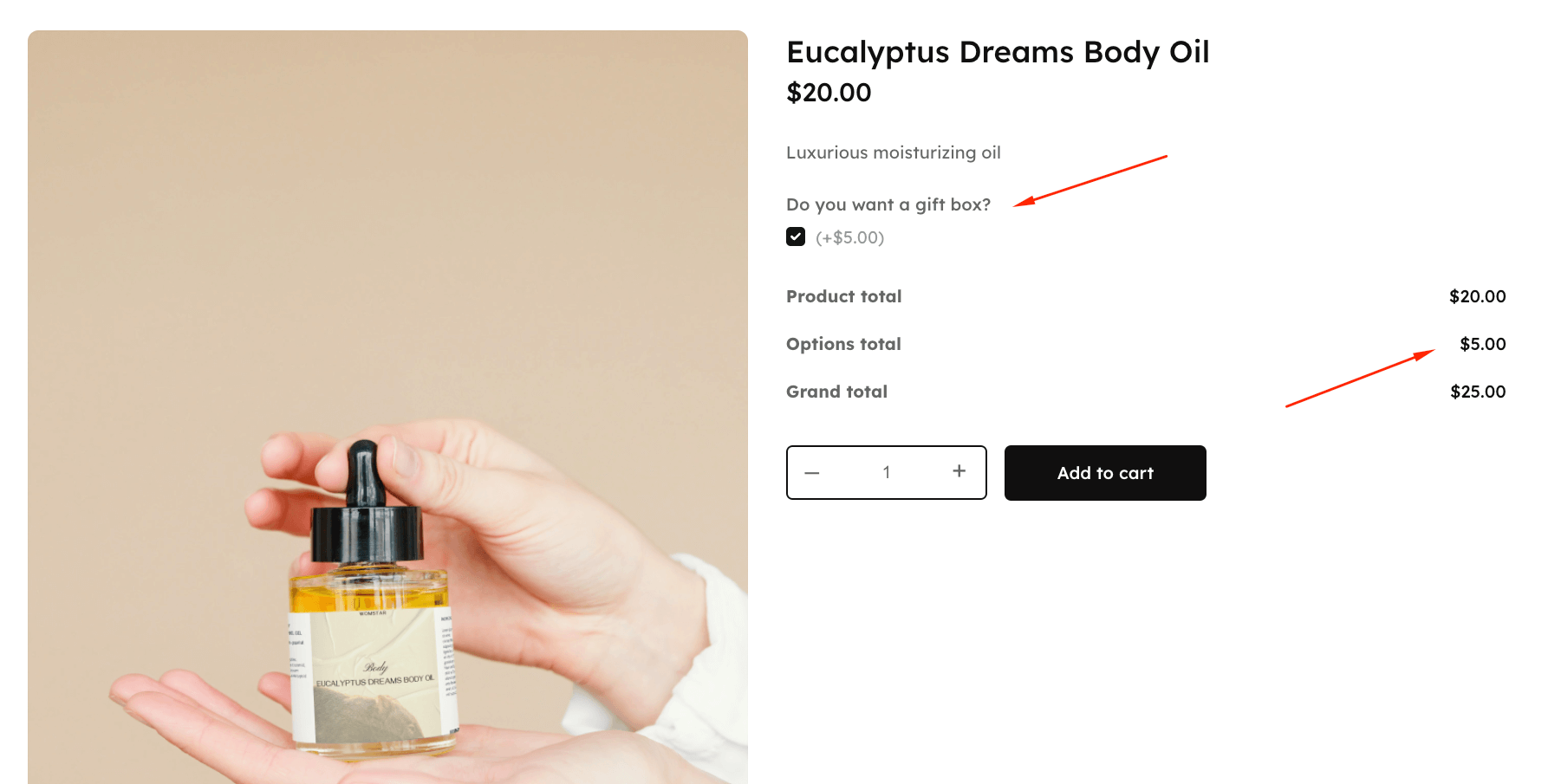
- First, click on “Add new product” or “Edit” on an existing product. We decided to add a gift box option for a body oil produc
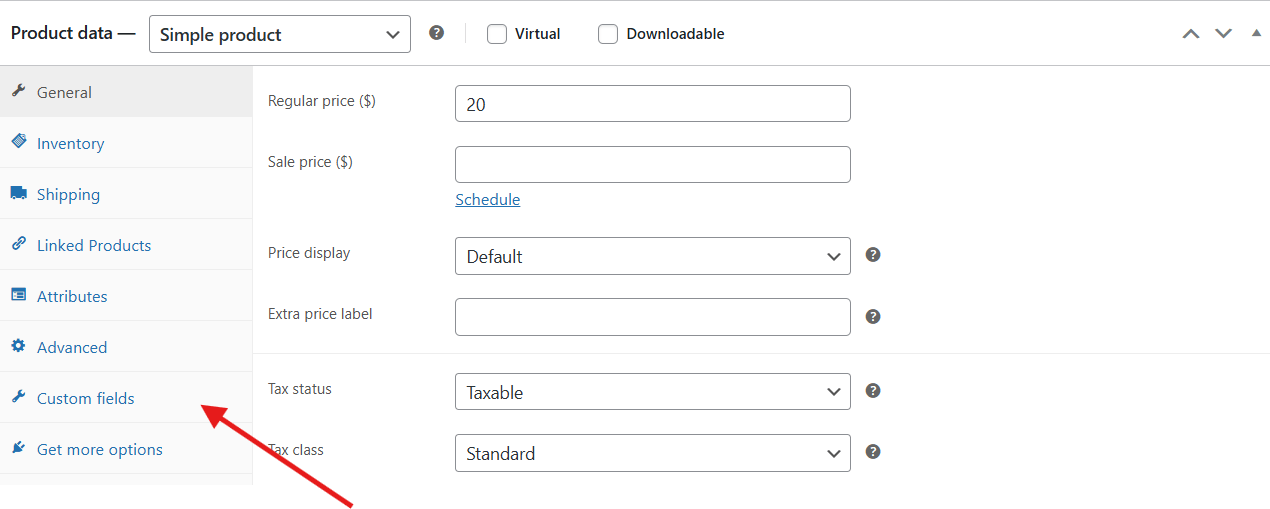
- On the next page, scroll down to product data and then select “Custom fields”.
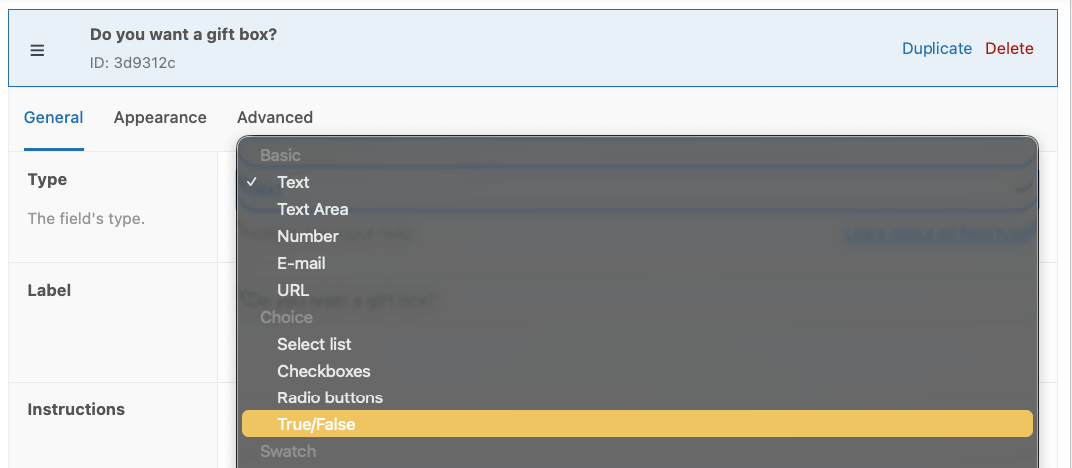
- Select “Add new field” and then select “True/false” under “Type”. Make sure to label your field clearly – something like “Do you want a gift box?”.
- Scroll down and select “Yes” under “Adjust pricing” and then set your price.

- Finally, save your changes and then preview your product.
How to set up tiered packaging options with APF
Now, let’s run you through how to add tiered packaging options that show up for customers wanting a gift box. Don’t worry, it’s just as simple:
- Add a new field and select “Image swatches” as the type.
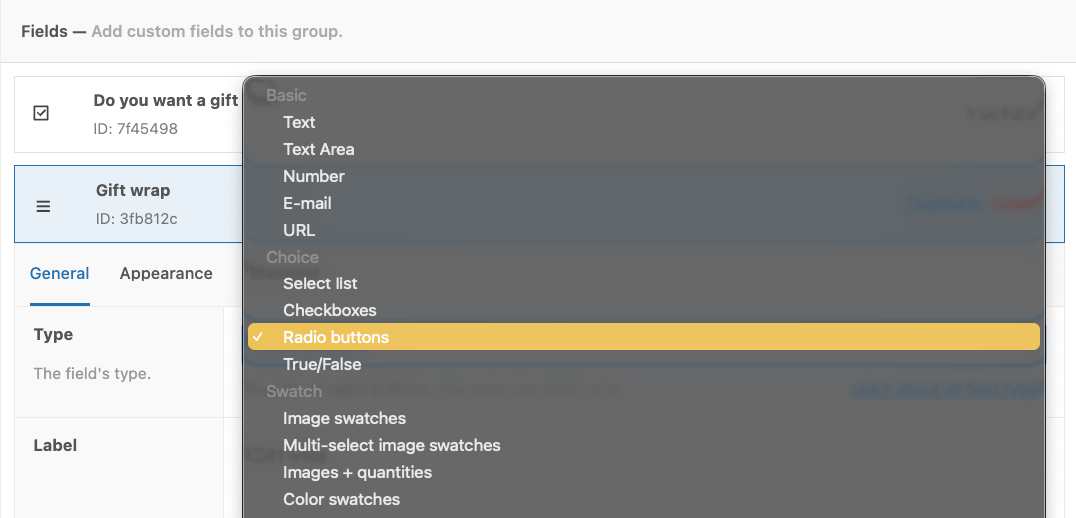
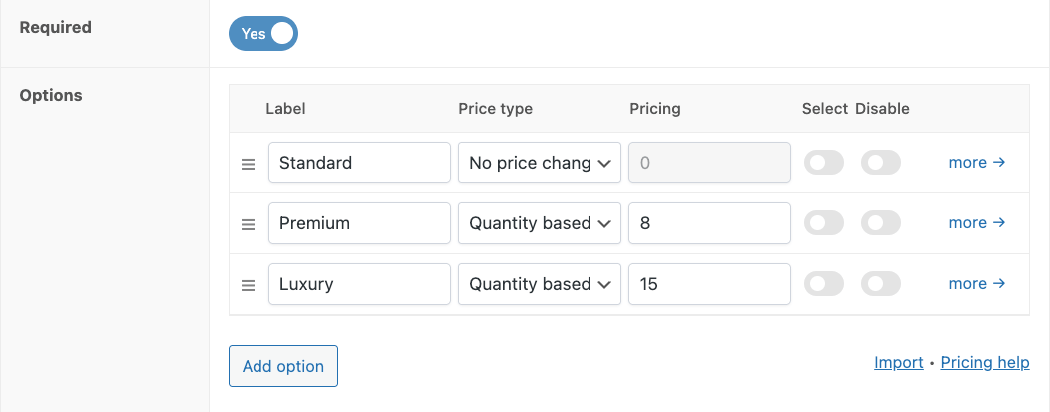
- Scroll down and add your packaging options. We went with “Standard”, “Premium”, and “Luxury” and added a flat fee per option, based on quantity.
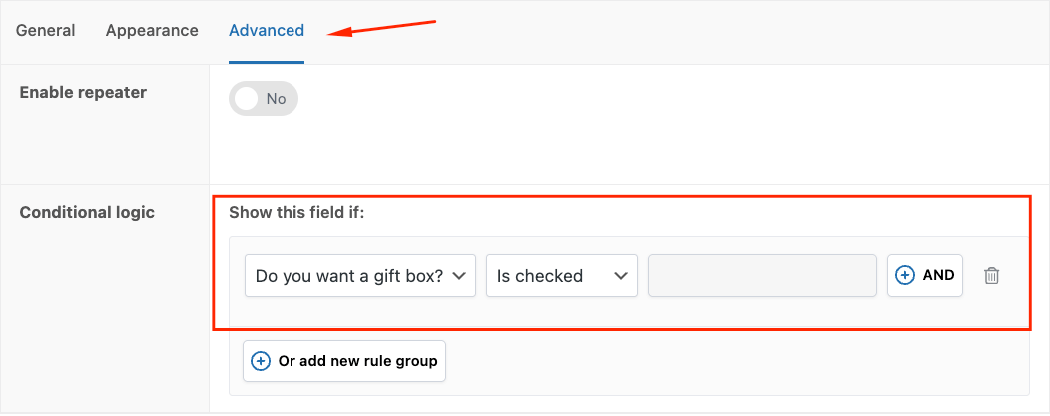
- Go to the Advanced tab and add a new conditional rule for this field to only appear if users select the checkbox field for the gift box.
- Save your edits, and then preview your product.
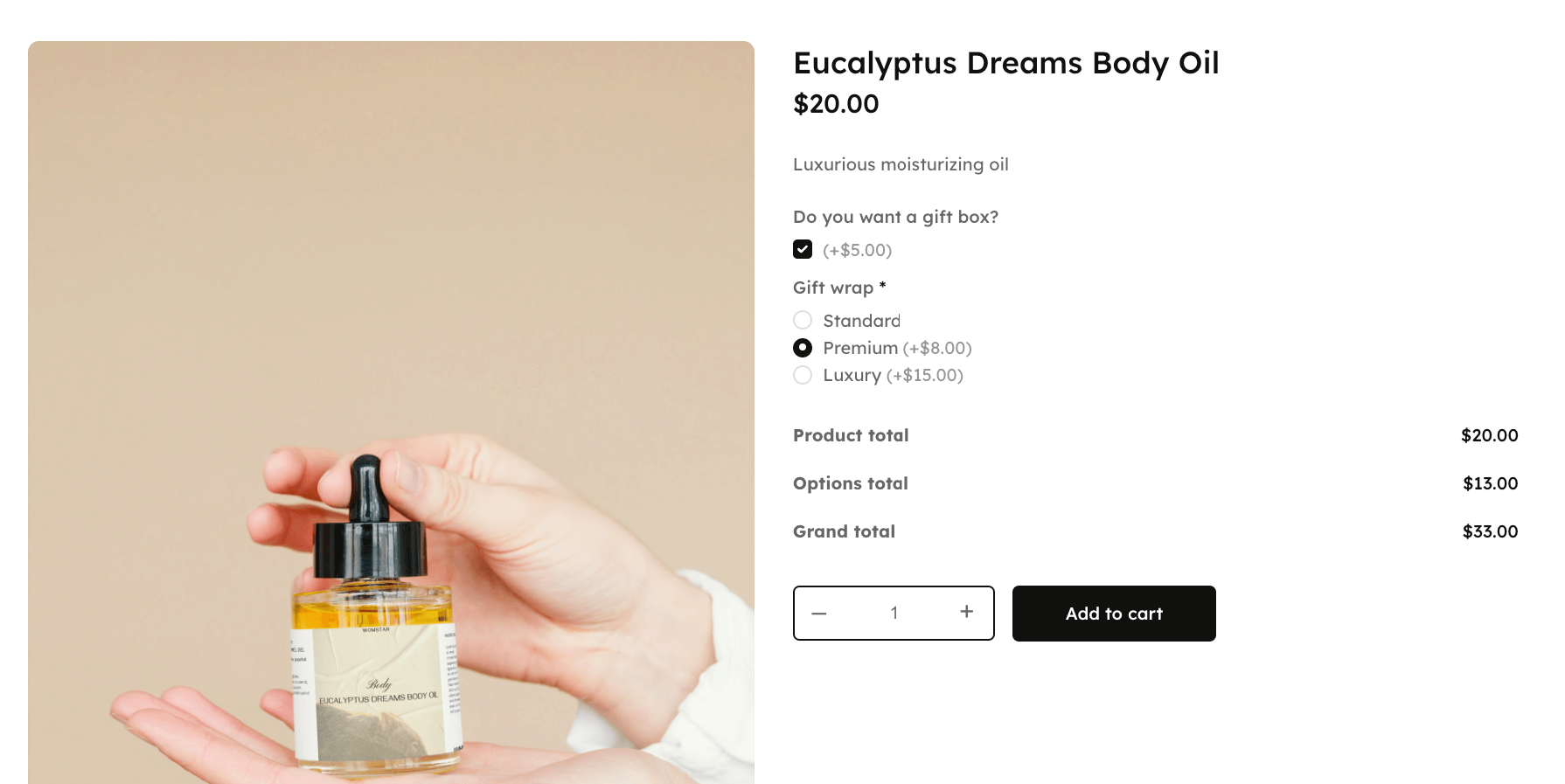
And with that, you’re done.
Best Practices for Product-Level Handling Fees
Charging for services like gift wrapping or fragile-item protection is smart business—it ensures you’re compensated for your time and materials. But if done poorly, it can feel like a hidden surcharge. Here’s how to do it right and still deliver excellent customer service:
- Be Transparent Upfront
Display handling fees on the product page—not just at checkout. Shoppers hate surprise charges. When fees are shown early, trust goes up, and cart abandonment goes down.
- Use Clear, Value-Focused Labels
✅ Good: “Fragile Item Protection”
❌ Bad: “Handling Fee”
Specific labels show purpose and value. Generic ones feel like price padding.
- Explain What the Fee Covers
Break it down:
“Includes bubble wrap, reinforced box, and extra packing materials to ensure safe delivery.”
This kind of detail builds credibility.
- Frame It as a Premium Option
Say: “Premium Gift Packaging”, not “Gift Wrap Fee.”
Make it feel like an upgrade, not a penalty.
- Address the ‘Why’ with an FAQ
Answer common questions like:
“Why do you charge this?”
Provide real cost breakdowns:
“Our eco-friendly packaging costs $1.80 more than standard boxes and takes 5 minutes of manual assembly.”
This shows you’re charging fairly—not inflating prices.
How Much Should You Charge for Gift Wrapping?
Start with your real costs:
Materials: $1–$3 (paper, ribbon, boxes)
Labor: $1.50–$3 (5–10 minutes @ $18/hr)
Overhead: Add 10–15% (storage, wear-and-tear)
Typical Ranges:
Basic Wrap: $3–$5
Premium Gift Box: $7–$10
Luxury Presentation: $12–$15
Don’t underprice just to match competitors. Charge based on your actual costs to stay profitable and fair.
Technical Best Practices
To keep your fees effective and seamless:
Test mobile views: Make sure fee fields and pricing updates work flawlessly on smartphones.
Apply the right tax class: Ensure fees align with local tax rules—many inherit the product’s tax rate.
Test coupons: WooCommerce applies discounts to total price + fees. Make sure this aligns with your offer.
Simulate refunds: How does your store handle partial refunds with fees? One item returned = one-third of the fee?
Monitor cart abandonment: A jump of over 5% post-launch suggests your fees might be too high—or unclear.
Match Fees to Their Source
Product-specific costs (gift wrapping, engraving, fragile protection)? → Use product-level tools.
Cart-wide costs (small-order surcharge, admin fees)? → Use cart-level plugins.
Advanced Product Fields is your best friend for product-level handling fees. With conditional logic, live price updates, and accurate tax/refund handling, it makes fees clear, fair, and easy to manage.
Ready to set up product-level handling fees that actually work for you and your customers?
Download Advanced Product Fields and make your checkout smoother, more transparent, and more profitable.